CMMC Level 2 Compliance Software: Everything You Need to Know
Cybersecurity has become a top priority for organizations working with the U.S. Department of Defense (DoD). Protecting Controlled Unclassified Information (CUI) is no longer optional — it’s a requirement. As businesses prepare for CMMC 2.0 assessments, many are turning to CMMC Level 2 compliance software to simplify compliance management, reduce manual work, and improve audit readiness.
This tutorial describes what software is, how it functions, and why it is becoming a crucial tool for defense contractors if you are assessing software to assist your compliance journey.
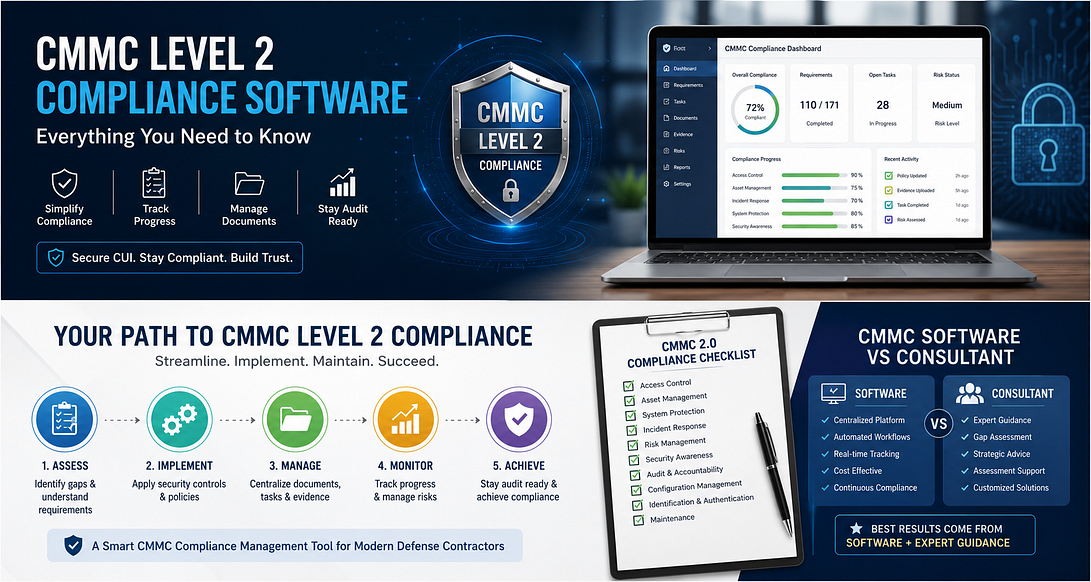
What Is CMMC Level 2 Compliance Software?
CMMC Level 2 compliance software is a centralized platform that helps organizations manage the requirements of the Cybersecurity Maturity Model Certification (CMMC) Level 2. Instead of tracking policies, evidence, risk assessments, and remediation tasks across multiple spreadsheets and documents, the software organizes everything in one secure location.
These platforms are designed to help organizations monitor progress, document security controls, assign tasks, and prepare for assessments with greater efficiency.
Why Businesses Need Compliance Software
Meeting CMMC Level 2 requirements involves much more than creating documentation. Organizations must demonstrate that cybersecurity controls are implemented, maintained, and supported with evidence.
Without the right tools, teams often struggle with:
* Managing large amounts of documentation
* Tracking compliance progress
* Monitoring remediation activities
* Maintaining version-controlled policies
* Preparing evidence for assessments
* Coordinating work across multiple departments
A reliable CMMC compliance management tool helps solve these challenges while improving visibility across the entire compliance process.
Key Features of CMMC Level 2 Compliance Software
Not every compliance platform offers the same capabilities. The best solutions provide features that simplify both preparation and long-term compliance management.
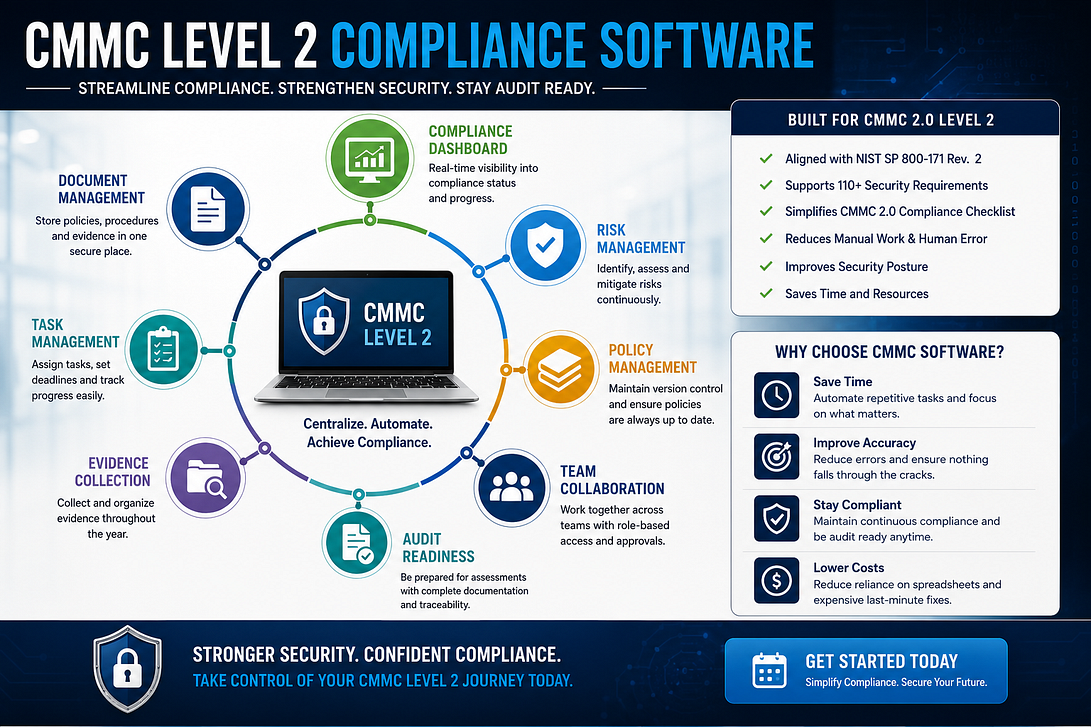
Centralized Documentation
Store policies, procedures, security plans, and supporting evidence in one secure location for easy access and better organization.
Compliance Dashboard
Interactive dashboards provide a clear overview of completed requirements, outstanding tasks, and overall compliance status.
Task Management
Assign remediation tasks, set deadlines, and monitor progress across security, IT, and compliance teams.
Evidence Collection
Collect and organize audit evidence throughout the year instead of rushing to prepare documentation before an assessment.
Policy Management
Maintain updated security policies with version control and approval tracking to support ongoing compliance.
Risk Tracking
Monitor identified risks, document mitigation efforts, and demonstrate continuous improvement throughout your cybersecurity program.
Benefits of Using a CMMC Compliance Management Tool
Implementing dedicated compliance software offers several advantages beyond simply preparing for certification.
Saves Time
Automation reduces repetitive administrative work, allowing teams to focus on strengthening cybersecurity rather than managing spreadsheets.
Improves Organization
All compliance-related information is stored in one centralized platform, making documentation easier to locate and maintain.
Enhances Collaboration
Compliance requires input from multiple departments. Software enables security teams, IT professionals, management, and auditors to collaborate more efficiently.
Increases Audit Readiness
By continuously collecting evidence and tracking progress, organizations are better prepared when formal assessments begin.
Supports Ongoing Compliance
Cybersecurity compliance is not a one-time project. Software helps organizations continuously monitor controls and maintain documentation as requirements evolve.
Understanding the CMMC 2.0 Compliance Checklist
One of the most valuable features of modern compliance platforms is support for the CMMC 2.0 compliance checklist. Organizations can use structured workflows to track their progress instead of manually keeping track of every need.
A typical checklist may include:
* Security policy documentation
* Access control implementation
* Multi-factor authentication
* Incident response planning
* Risk assessments
* Security awareness training
* Asset inventory
* Configuration management
* Vulnerability management
* Evidence collection
* Internal reviews
* Corrective action tracking
Using a digital checklist reduces the risk of overlooking critical compliance requirements.
CMMC Software vs Consultant
Many organizations ask whether they should purchase compliance software or hire a consultant. The answer depends on their internal expertise and project complexity.
A comparison of CMMC software vs consultant highlights the strengths of each approach.
Compliance Software
Best for organizations that want:
* Centralized documentation
* Continuous compliance monitoring
* Automated task management
* Long-term compliance management
* Better internal collaboration
Compliance Consultant
Best for organizations that need:
* Strategic guidance
* Gap assessments
* Expert interpretation of requirements
* Assessment preparation
* Customized compliance recommendations
In many cases, businesses achieve the best results by combining compliance software with guidance from an experienced consultant. The software manages day-to-day compliance activities, while consultants provide expert advice during implementation and assessment preparation.
How to Choose the Right CMMC Level 2 Compliance Software
When evaluating different platforms, consider:
* Ease of use
* Dashboard and reporting capabilities
* Document management features
* Workflow automation
* Evidence collection tools
* Scalability
* Security controls
* Customer support
* Integration with existing systems
Choosing the appropriate platform should make your compliance process easier rather than more difficult.
Conclusion
Preparing for CMMC certification requires careful planning, accurate documentation, and continuous monitoring. Investing in CMMC Level 2 compliance software helps organizations streamline compliance activities, improve collaboration, and stay audit-ready throughout the year.
Whether you’re beginning your compliance journey or strengthening an existing cybersecurity program, choosing the right CMMC compliance management tool can reduce administrative effort while supporting long-term regulatory success.
Frequently Asked Questions
1. What is CMMC Level 2 compliance software?
CMMC Level 2 compliance software is a platform that helps organizations manage documentation, evidence, task tracking, policy management, and audit preparation for CMMC 2.0 certification.
2. How does a CMMC compliance management tool help businesses?
It centralizes compliance activities, automates workflows, tracks remediation efforts, organizes documentation, and improves readiness for cybersecurity assessments.
3. Should I use CMMC software or hire a consultant?
Software helps manage daily compliance activities and documentation, while consultants provide strategic guidance and expert support. Many organizations benefit from using both together for a more efficient compliance process.
Call to Action
Simplify your cybersecurity compliance journey with the right CMMC Level 2 compliance software. Choose a solution that helps you manage documentation, track progress, organize evidence, and prepare confidently for CMMC 2.0 assessments. Start building a stronger, more efficient compliance program today and stay ready for future security requirements.


Comments
Post a Comment